
Simple Demo Using Real Data
Stanislav Traykov
2026-03-08
Source:vignettes/articles/simple-demo-using-real-data.Rmd
simple-demo-using-real-data.RmdThis vignette demonstrates a simple workflow using downloaded fund
files. For a comprehensive introduction using example data files, see
vignette("importing-and-computing-differences"). For
information on how to get data from fund and index providers, see fundsr’s GitHub
wiki. More complex workflows are shipped without data under
scripts/examples in the package directory (start with
glob_funds.R or all_funds.R). The installation
path can be discovered via
system.file("scripts/examples", package = "fundsr").
Setup
Set up directories.
dirs <- c(
    data = file.path("data", "funds"),
    xlm = file.path("data", "xlm"),
    out = "output"
)
for (d in dirs) {
    dir.create(d, recursive = TRUE)
}
Populate the XLM directory with some monthly XLM reports.
base_url <- "https://www.cashmarket.deutsche-boerse.com/resource/blob/"
file_suffix <- "-ETF-ETP-Statistic.xlsx"
blob_paths <- c(
  "4844258/91ce589f5309cbbd1ad0c92b3e6cdbda/data/20251130",
  "4795286/394c4451af562507f9def3f39da62242/data/20251031",
  "4725636/2d62a1677b537d996aefc45df3ff21d3/data/20250930",
  "4674370/0de847380722e8e87bc821cb5313ba41/data/20250831"
)
xlm_urls <- paste0(base_url, blob_paths, file_suffix)
for (url in xlm_urls) {
    fname <- basename(url)
    dest_path <- file.path(dirs[["xlm"]], fname)
    if (!file.exists(dest_path)) {
        download.file(url, destfile = dest_path, mode = "wb", quiet = TRUE)
        Sys.sleep(stats::runif(1, 0.5, 1.0))
    }
}
Import all XLM files into a tibble.
if (!exists("xlm_data")) {
    xlm_data <- read_xlm_directory(dirs[["xlm"]])
}
#> ℹ Reading XLM directory: 'data/xlm'
Set package options.
fundsr_options(
    data_dir = dirs[["data"]],
    out_dir = dirs[["out"]],
    # internal_png = TRUE, # output PNGs without Inkscape
    # inkscape = "path/to/inkscape" # set only if auto-detection fails
)

# Helper to add urls to option fundsr.fund_urls
add_fund_urls(c(
    IUSQ = "https://www.ishares.com/uk/individual/en/products/251850/ishares-msci-acwi-ucits-etf/1535604580409.ajax?fileType=xls&fileName=iShares-MSCI-ACWI-UCITS-ETF-USD-Acc_fund&dataType=fund",
    SPYY = "https://www.ssga.com/ie/en_gb/institutional/library-content/products/fund-data/etfs/emea/navhist-emea-en-spyy-gy.xlsx"
))
Download and import
Populate funds directory (download URLs listed in option
fundsr.fund_urls).
download_fund_data() # downloads as SPYY.xlsx, IUSQ.xls
#> ℹ Downloading 'IUSQ'
#> ℹ Downloading 'SPYY'
Register data loader calling vendor-specific wrappers around
import_fund().
add_data_loader(function() {
    # this loads the downloaded SPYY.xlsx
    spdr("SPYY", benchmark = "ACWI")
    # loads IUSQ.xls, also retrieves ACWI (net) from the file
    ishs("IUSQ", benchmark = "ACWI", retrieve_benchmark = T)
})
Get fund and index data into a master table.
series <- build_all_series() %>%
    filter(date >= as_date("2012-12-29"))
#> ℹ Reading Excel: 'data/funds/SPYY.xlsx'
#> ℹ Reading Excel: 'data/funds/IUSQ.xls'
Check contents.
series %>% filter(date >= as_date("2015-04-03"))
#> # A tibble: 2,804 × 4
#>    date        iusq  ACWI  spyy
#>    <date>     <dbl> <dbl> <dbl>
#>  1 2015-04-06  38.2  153.   NA
#>  2 2015-04-07  38.5  154.  101.
#>  3 2015-04-08  38.6  154.  101.
#>  4 2015-04-09  38.7  154.  101.
#>  5 2015-04-10  38.9  155.  102.
#>  6 2015-04-13  38.8  155.  102.
#>  7 2015-04-14  38.9  155.  102.
#>  8 2015-04-15  39.0  156.  102.
#>  9 2015-04-16  39.1  156.  102.
#> 10 2015-04-17  38.7  155.  101.
#> # ℹ 2,794 more rows
get_fund_index_map()
#>   spyy   iusq
#> "ACWI" "ACWI"
Compute
Calculate CAGR and log-return differences with a 365-day rolling window.
nd <- 365
diffs <- roll_diffs(series, nd, get_fund_index_map())
#> ℹ Roll diffs spyy -> ACWI
#> ℹ Roll diffs iusq -> ACWI
diffs$cagr %>% slice_tail(n = 3)
#>         date        spyy         iusq
#> 1 2026-03-04 0.003726230 0.0008124696
#> 2 2026-03-05 0.003508688 0.0006196091
#> 3 2026-03-06          NA           NA
diffs$log %>% slice_tail(n = 3)
#>         date       spyy         iusq
#> 1 2026-03-04 0.00300919 0.0006568980
#> 2 2026-03-05 0.00288526 0.0005101219
#> 3 2026-03-06         NA           NA
Plot specifications
no_filter <- NULL
zoom_filter <- function(x) {x %>% filter(date >= as_date("2022-01-01"))}
acwi_funds <- c("spyy", "iusq")
gg_par <- scale_color_manual(values = c("iusq" = "red", "spyy" = "blue"),
                             labels = toupper)

plot_spec <- tribble(
    ~plot_id, ~title, ~data_filter,
    ~gg_params, ~width,  ~height,
    ~funds,

    "ACWI", "SPYY & IUSQ", no_filter,
    gg_par, 14, 9,
    acwi_funds,

    "ACWIz",
    c(en = "SPYY & IUSQ: recent years",
      bg = "SPYY & IUSQ: последни години"),
    zoom_filter,
    gg_par, 14, 9,
    acwi_funds
)
Plot
Run the plots! This outputs SVG files and queues plots for optional
PNG export using Inkscape (see blow). It may also output lower-quality
PNGs (if option fundsr.internal_png is
TRUE).
p <- run_plots(diffs, nd, plot_spec, xlm_data)
#> ℹ plot_roll_diffs: 365d rolling CAGR differences vs net benchmark: SPYY & IUSQ
#> ℹ plot_xlms: spyy, iusq
#> ℹ plot_roll_diffs: 365d rolling log-return differences vs net benchmark: SPYY & IUSQ
#> ℹ plot_roll_diffs: 365d rolling CAGR differences vs net benchmark: SPYY & IUSQ: recent years
#> ℹ plot_roll_diffs: 365d rolling log-return differences vs net benchmark: SPYY & IUSQ: recent years
Output
p[["ACWI"]]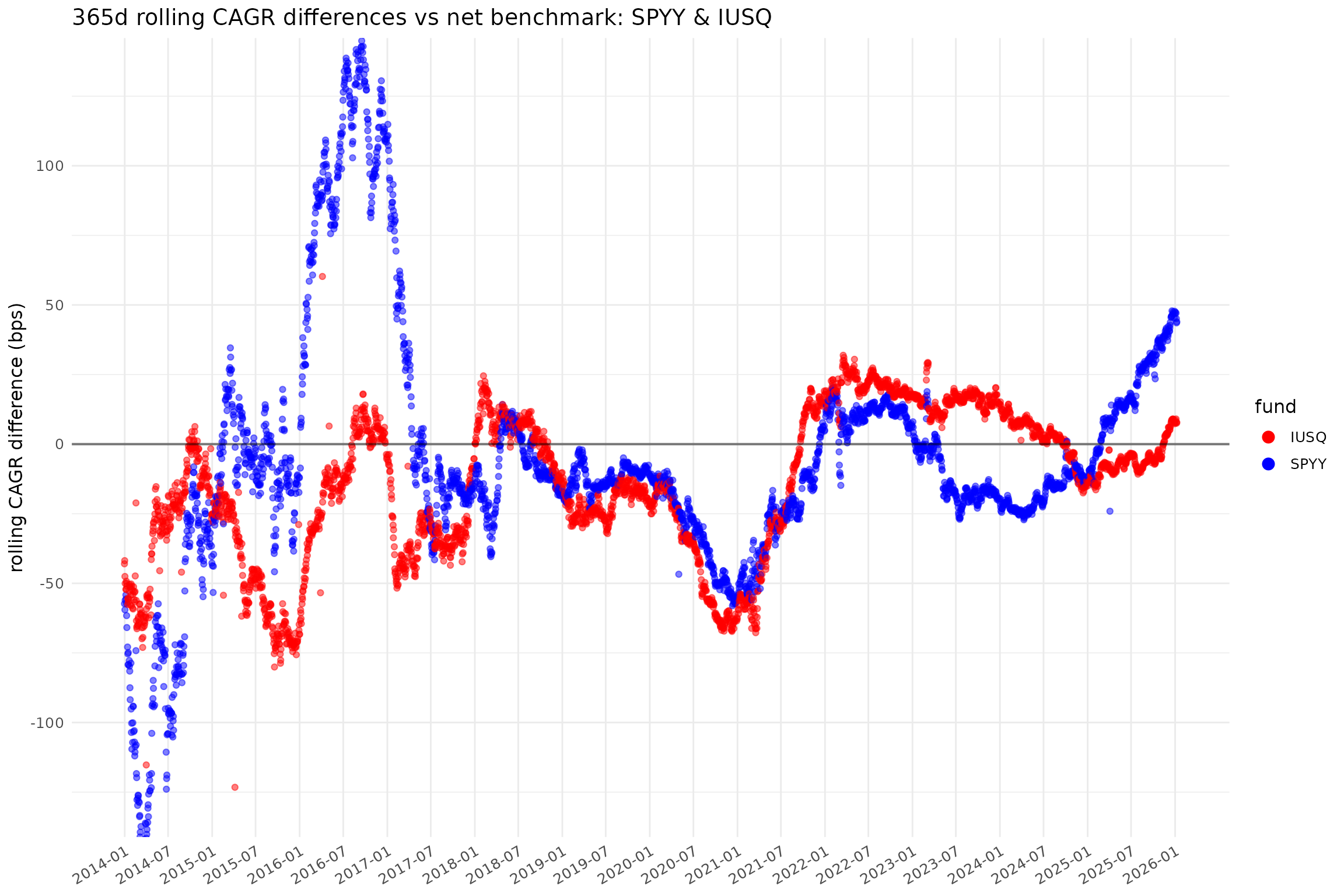
p[["ACWI_L"]]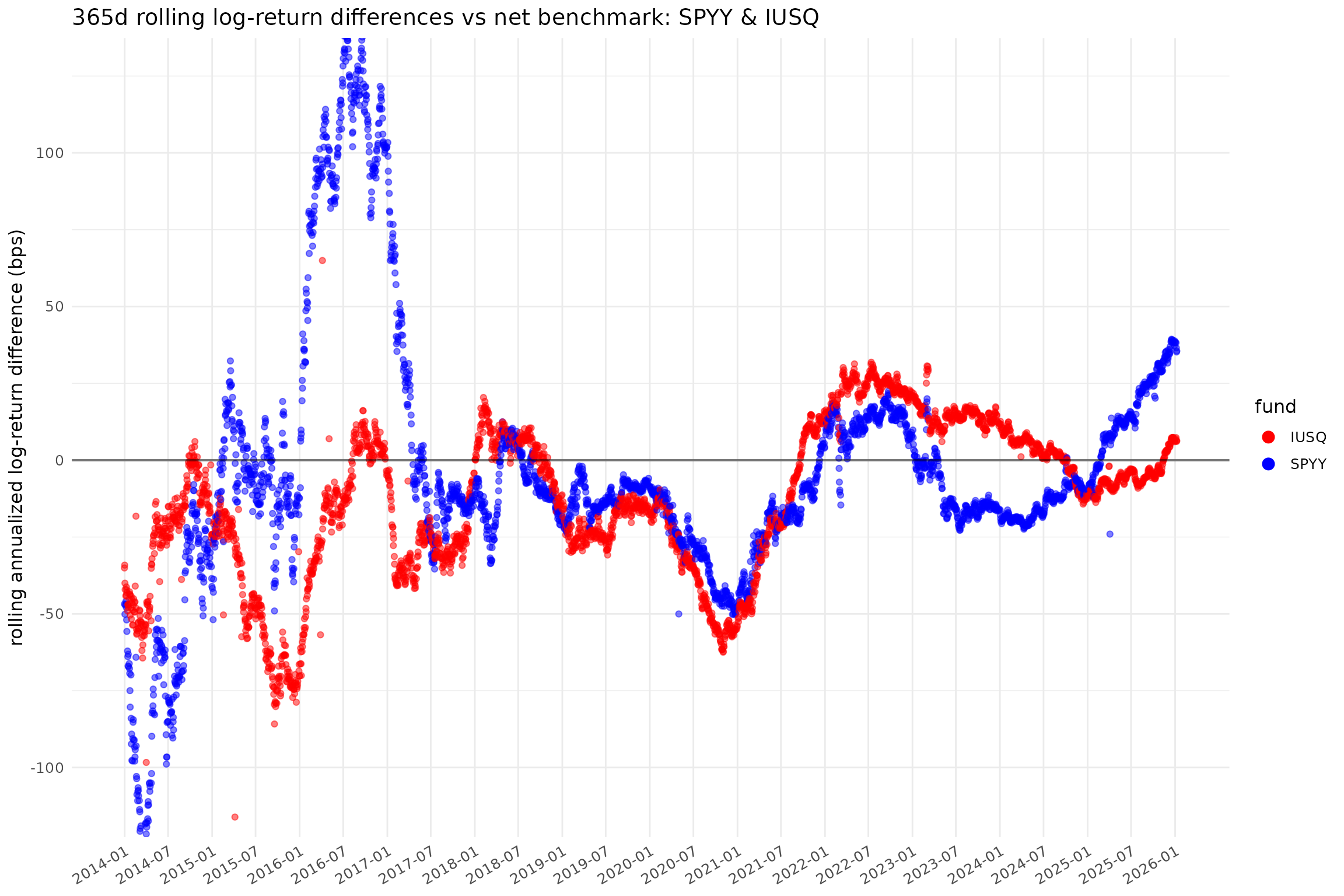
p[["ACWIz_L"]]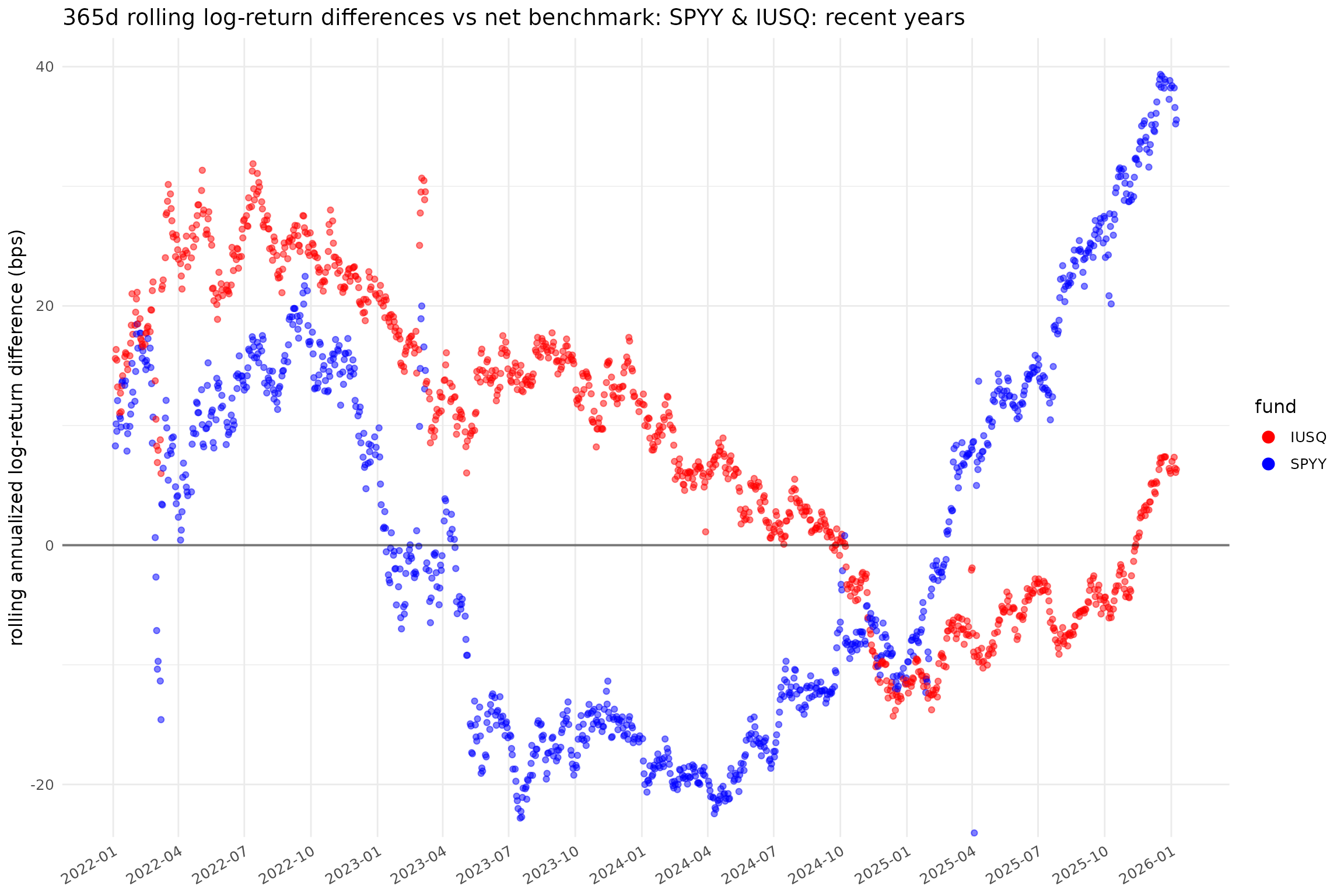
p[["xlm_ACWI"]]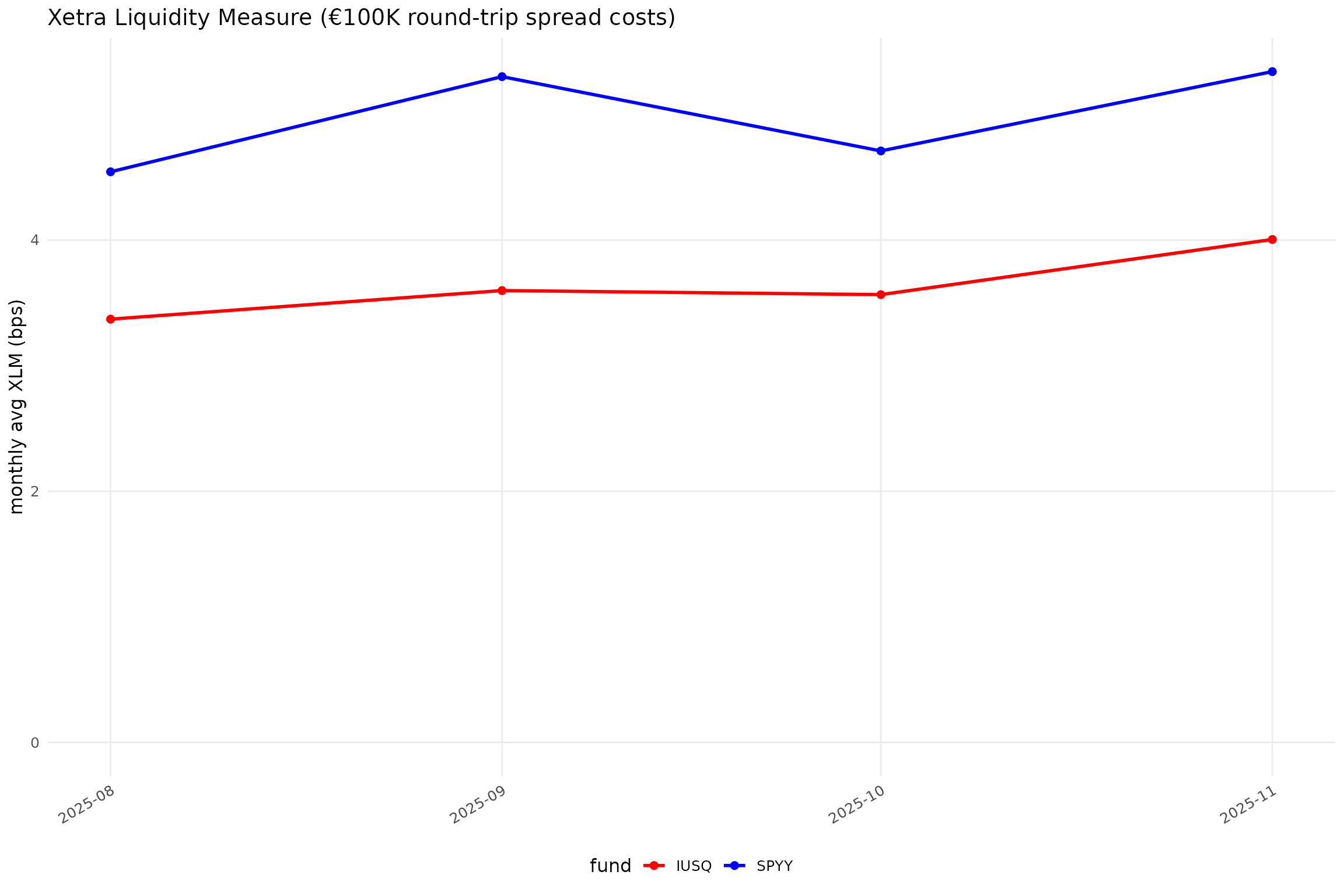
Corresponding SVG files should be in the output
directory.
Plot in another language
Sys.setlocale("LC_MESSAGES", "bg_BG.UTF-8") # needed on some systems
#> [1] "bg_BG.UTF-8"
Sys.setLanguage("bg")
plot_spec_bg <- plot_spec %>%
    mutate(plot_id = paste0(plot_id, "_bg"))
bg_p <- run_plots(diffs, nd, plot_spec_bg, xlm_data)
#> ℹ plot_roll_diffs: 365-дневни плъзгащи се CAGR разлики спрямо нетен индекс: SPYY & IUSQ
#> ℹ plot_xlms: spyy, iusq
#> ℹ plot_roll_diffs: 365-дневни плъзгащи се разлики в log доходност спрямо нетен индекс: SPYY & IUSQ
#> ℹ plot_roll_diffs: 365-дневни плъзгащи се CAGR разлики спрямо нетен индекс: SPYY & IUSQ: последни години
#> ℹ plot_roll_diffs: 365-дневни плъзгащи се разлики в log доходност спрямо нетен индекс: SPYY & IUSQ: последни години
bg_p[["ACWIz_bg_L"]]
#> NULL
bg_p[["xlm_ACWI_bg"]]
#> NULL
Optional high-quality PNG export
Process queued files via Inkscape (converting SVG to PNG).
export_pngs()
#> ℹ Executing "C:/Program Files/Inkscape/bin/inkscape.exe"
#>   --actions="export-background:white;file-open:output/ACWI.svg;export-filename:output/ACWI.png;export-width:1300;export-do;file-close;file-open:output/xlm_ACWI.svg;export-filename:output/xlm_ACWI.png;export-width:1300;export-do;file-close;file-open:output/ACWI_L.svg;export-filename:output/ACWI_L.png;export-width:1300;export-do;file-close;file-open:output/ACWIz.svg;export-filename:output/ACWIz.png;export-width:1300;export-do;file-close;file-open:output/ACWIz_L.svg;export-filename:output/ACWIz_L.png;export-width:1300;export-do;file-close;file-open:output/ACWI_bg.svg;export-filename:output/ACWI_bg.png;export-width:1300;export-do;file-close;file-open:output/xlm_ACWI_bg.svg;export-filename:output/xlm_ACWI_bg.png;export-width:1300;export-do;file-close;file-open:output/ACWI_bg_L.svg;export-filename:output/ACWI_bg_L.png;export-width:1300;export-do;file-close;file-open:output/ACWIz_bg.svg;export-filename:output/ACWIz_bg.png;export-width:1300;export-do;file-close;file-open:output/ACWIz_bg_L.svg;export-filename:output/ACWIz_bg_L.png;export-width:1300;export-do;file-close"
#> [1] 0